toc
Advanced
User's Section
Return to
Main Index
CGI Script
Resources
There are many good resources for CGI scripts found on
the web. The scripts at Matt's Script Archive found at http://www.worldwidemart.com/scripts
are very good. Many of our scripts come from there. Another
excellent resource is The CGI Resource Index found at http://www.cgi-perl.com/
Unless you are an expert on the subject, you should look for scripts that
are very well documented and come with step-by-step instructions.
You may contact us for help or installation if you like.
Paths
to Date, Mail, Perl, etc. (Advanced Users)
CGI scripts often require paths to common server resources.
These paths are as follows:
(puts you in your web directory) (puts you in your
cgi-bin)
Sendmail: /usr/sbin/sendmail
Perl5.003: /usr/bin/perl
Perl5.004: /usr/bin/perl5.004
(Full 5.004 lib support not available currently)
Date: /bin/date
Java: /usr/bin/java
Python: /usr/bin/python
Domain path: /www/yourdomain
Cgi-bin path: /www/yourdomain/cgi-bin
Return
to Main Index
Go To Top of Page
Setting
Permissions (Advanced Users)
The following is a simple explanation of file permissions
in Unix. To list the access permissions of a file or directory, telnet
to your server, then type:
cd directoryname
to change the directory until you are either in the directory
above the file you are interested in, or above the directory you are checking.
Type: ls -l filename
and you will see what the current permission settings
are for that file, along with other information.
Examples of using
chmod:
|
PEOPLE
|
PERMISSIONS
|
| u = the file's user (you) |
r = read access |
| g = the file's group |
x = execute access |
| o = others |
w = write access |
| a = the user, the group, and others |
|
To change permissions for a file named filename.cgi,
you need to chmod the file (change mode). For example, when you type this:
chmod u=rwx,g=rx,o=rx filename.cgi
you've given:
read, execute, and write access
to the user (that's you)
read and execute access to the
group and
read and execute access to others
Some scripts will tell you to chmod 775 (for example).
Doing the above is the same thing as typing chmod 775. You can use either
method with our Unix servers. Let me explain:
When using the numeric system, the code for permissions
is as follows:
r = 4 w = 2 x = 1 rwx = 7
The first 7 of our chmod775 tells Unix to change the
user's permissions to rxw (because r=4 + w=2 + x=1 adds up to 7. The second
7 applies to the group, and the last number 5, refers to others (4+1=5).
When doing an ls -l on the file, telnet always shows
the permissions this way:
-rwxr-xr-x
Ignore the first dash, then break up the above
into three groups of letters. If there's a dash where a letter should be,
it means that there is no permission for those people.
Remember: the first 3 apply to user, the second
3 apply to group, and the third 3 apply to others.
Return
to Main Index
Go To Top of Page
Change
Permissions with Fetch
Some FTP clients support changing permissions in a more
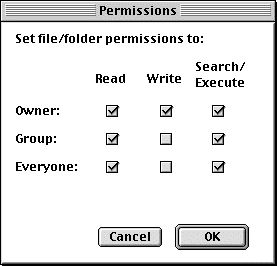
graphical way. If you have Fetch for the Mac, you have an easy way to change
permissions.
-
-
FTP into your account on the server.
-
Go to the file you want to change the permissions on, and
highlight it.
-
Under the Remote menu, select Change Permissions.
-
A window will pop up showing the current permissions for
the file you highlighted. Click on the boxes to change permissions
as needed.
Return
to Main Index
Go To Top of Page
Change
Permissions with WS_FTP
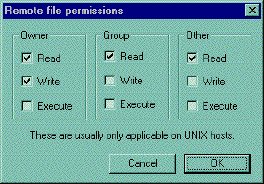
WS_FTP also makes changing permissions simple.
-
FTP into your account on the server
-
Highlight the file you want to check permissions on and reight-click
it.
-
A menu will pop up. Select CHMOD
-
You will see a
-
Just highlight the file you want to check, and right-click
on it. A
-
menu will pop up, then select CHMOD.
-
You will see the window listing applicable permissions. Check
the ones you want.
Return
to Main Index
Go To Top of Page
CGI Troubleshooting
Q & A (Advanced Users)
Here are the solutions to some of the more common
CGI script problems, in question and answer format. You will find a list
of proper permission settings for the scripts we provide at the end.
Question: When I activate my
CGI program, I get back a page that says "Internal Server Error. The server
encountered an internal error or misconfiguration and was unable to complete
your request."
Answer: This is generally
caused by a problem within the script. You will need to login via Telnet
and test your script in local mode to get a better idea of what the problem
is. You will need to first get into the directory in which your script
is located, then execute the script. You can execute the script in either
of two ways:
1) Type "perl myscript.pl" (Perl being
the language interpreter in this case).
Or
2) Simply type "myscript.pl" alone, that will work
if the first line is well written to indicate the location of Perl.
The first one is useful to see if there's any error
IN your script. The second one is useful to test if your "calling line"
(the first line of the script) is okay, i.e. if you entered the right location
of Perl.
Question: I am being getting a "File Not
Found," or "No Such File or Directory." error.
Answer: Upload your Perl or CGI script
in ASCII mode, not binary mode.
Question: When I test my Perl
script in local mode (by Telnet), I have the following error: "Literal
@domain now requires backslash at myscript.pl line 3, within string.
Execution of myscript.pl aborted due to compilation errors."
Answer: This is caused by a
misinterpretation by Perl., The "@" sign has a special meaning in
Perl; it identifies an array (a table of elements). Since it cannot find
the array named domain, it generates an error. You should place a
backslash (\) before the "@" symbol to tell Perl to see it as a regular
symbol, as in an email address.
Question: I am getting the message
"POST not implemented."
Answer: You are probably using
the wrong reference for cgiemail. Use the reference /cgi-bin/cgiemail/mail.txt.
Another possibility is that you are pointing to a cgi-bin script
that you have not put in your cgi-bin directory. In general, this message
really means that the web server is not recognizing the cgi-bin script
you are calling as a program. It thinks it is a regular text file.
Question: It's saying I don't
have permission to access
IMPORTANT: CGI scripts MUST be uploaded/downloaded in
ASCII format. They must also be saved in ASCII (text or .txt) format.
This is very important. Failure to follow these guidelines will result
in an inoperable program.
Question: It's saying I
don't have permission to access
Answer: This error message means
that you are missing your index.htm file. Note that files that start with
a "." are hidden files. To see them, type ls -al. If you wish to FTP this
file in, go to the home/yourdomain directory.
Return
to Main Index
Go To Top of Page
Miva Empresa (Advanced
Users)
Miva makes building dynamic, data driven web pages as
easy as HTML. You can quickly develop interactive web pages that are 100%
browser independent. Miva runs on the web server, interprets the Miva tags
and outputs pure HTML to the browser. You can also use Miva to output Javascript
and other browser languages, and use the built-in database to easily manipulate
and publish data.
Full documentation and usage support for HTML Script
can be found at:
http://htmlscript.com/.
Miva offers a variety of features. You should visit their
site for more information.
We are running version 3.0 of HTML Script. The following
is what you will need to know for use on your domain.
-
The script being called is "miva", which is in your
cgi-bin.
-
The active pages (pages with .hts or .mv) need to be placed
in your root www directory, not in subdirectories.
-
A sample URL call for this would be as follows: http://yourdomain.com/cgi-bin/miva?yourpage.mv
HTMLSCRIPT has a variety of pre configured products
that require path information
we have preconfigured miva to automatically look
into the /home/domain/htsdata directory for data files. If data is
placed in this directory an example call would be as follows:
<export file="file.dat">
To call HTML script thru the secure server use the
following:
https://machine.safe-order.net/cgi-bin/smiva?yourdomain/yourpage.mv
machine should be replaced with the name
of the system your on, ie pan, artemis, osirus, ect . . .
Return
to Main Index
Go To Top of Page
More On The Miva Engine.
The Miva Engine makes building dynamic web sites
as easy as writing HTML. Quickly develop server and browser independent
dynamic sites using the XML standard. Dynamic sites that integrate scripting,
database, and commerce can be developed and tested on a Microsoft workstation
and deployed on Microsoft or Unix servers.
SUPPORTED STANDARDS
| HTML |
SGML |
XML |
HTTP |
| POP3 |
SMTP |
ISAPI |
CGI |
| NSAPI |
UNIX |
WINDOWS |
JAVA |
| ODBC |
xBASE |
APACHE |
JAVASCRIPT |
Miva runs as a pre-processor on the web server, interprets
the Miva tags and outputs standard HTML, XML, Javascript, and other
user interface code to the browser. Use the built-in database and ODBC
interfaces to easily manipulate and publish data. Anyone that knows HTML
can use Miva.
Return
to Main Index
Go To Top of Page
Miva
(Htmlscript 3.0) tags are XML compliant and include:
<MvEVALUATE>, <MvIF>, <MvELSE>, <MvWHILE>,
<MvEXPORT>, <MvIMPORT>, <MvCOMMERCE>, <MvLET>, <MvASSIGN>,
<MvCALL>, <MvHIDE>, <MvEXIT>, <MvCOMMENT>, <MvFUNCTION>,
<MvMAIL>, <MvOPEN>, <MvCLOSE>, <MvFIND>, <MvSKIP>,
<MvGO>, <MvADD>, <MvUPDATE>, <MvDELETE>, <MvUNDELETE>,
<MvMAKEINDEX>, <MvSETINDEX>, <MvREINDEX>, <MvPACK>, <MvPRIMARY>,
<MIVA>
Return
to Main Index
Go To Top of Page
PlusMail
Web Control
PlusMail has an advanced web control panel which allows
you to control all aspects of your web presence from a web browser.
Access for use: http://yourdomain.com/cgi-bin/plusmail
NOTE: Due to the unique security requirement of
the administration system you must have you browser set to allow cookies.
This in conjunction with a number of hidden verification systems assures
you are the only user allowed to access these features on your domain.
Return
to Main Index
Go To Top of Page
FTP Miallists
Use the folloiwng instructions to setup simple maillists
and subscribable maillists using FTP. Recommended for Advanced
Users only.
FTP Simple Maillists
To setup a maillist first create a simple text file.
Enter one address per line.
Example list
add1@email1.com
add2@email2.com
add3@email3.com
You can put up to 1000 names in the list. Once you are done
creating the list you go to your home directory and put the list
in the subdirectory maillists. The list may be named anything you
like, its important there’s no extension on the end.
Example:
clients (good name) clients.txt
(no good)
To use the list you just need to mail to the name of the
list. using the above example with a domain name of fred.com, to
email the list you would send to clients@fred.com. its that simple.
Note if your maillist is named clients
it cannot be used in the infobots directory or the .redirect file.
Return
to Main Index
Go To Top of Page
FTP Subscribable
Maillists
You can setup your maillist so your customers can subscribe
to it via email. There is a limit of 1,000 subscribers per list and you
cannot send email to the list larger than 75k. Here are the instructions
for setting up this list:
1. Set up a welcome message in the infobot
directory -- you can name it anything you like, but for our example we'll
call it Welcome. The text file could say:
"Welcome to our Maillist. You are now subscribed to
our list.
This message will be automatically returned to the sender
each time someone subscribes.
2. Now you need to set up a configuration
file to tell the mail system to build a mailing list. In your infobot directory
create a file called infolist. This is used to tell the system what
to do with addresses received from each infobot response. You can have
as many lists as you want. But in keeping with the list example above,
we will call it mlist. Here's what the file should look like:
welcome mlist
The first line should have a space between the two names
and be uploaded in ASCII format, not binary.
Return
to Main Index
Go To Top of Page
FTP Multiples
Lists
You can have multiple lists, such as mlist1, mlist2,
etc., but you should only have one configuration file. It must be called
infolist. To handle all three examples, you'd make the infolist file look
like this,
with each listserver on its own line, with no blank
lines in-between:
welcome mlist
welcome2 mlist2
welcome3 mlist3
2 When someone wants to subscribe to your list in
the above example, they would email welcome@yourdomain.com.
This would return the infobot created called "welcome"
and put their email address into the mailing list file in the maillists
directory on your server. You can go in and download the maillist file
after it has been created and people have subscribed. The mailing list
file will be created AFTER the first person subscribes, or if you yourself
send email to "welcome@yourdomain.com" to test it. Put yourself on the
mailing list to try this. People don't need to subscribe themselves --
you can add their names for them, or remove them at any time by modifying
and uploading the file in the "maillists" directory. People cannot automatically
unsubscribe themselves. You must go in and manually remove their email
address from the list.
3 When you want to send mail to all subscribers,
you can send email to mlist@yourdomain.com and the PlusMail system will
send it to the entire list.
4) If you want to see who is subscribing to your maillist
without having to go and check the maillists file periodically via
FTP, you can put a line in your .redirect file.
NOTE: it is important that you have the infobot
installed before entering the address line in the .redirect. For
the mlist example we used above, the line you would add would look like
this:
welcome yourdomain@yourdomain.com
The welcome document you created will be sent to the
subscriber, AND you will receive their email message.
Note: When sending email to your list for
the first time, you will get the autoresponder email back right away, but
you may not see the corresponding maillist file right away as our
system takes time to build it. Wait 15 or 30 minutes or so and it will
show up. (Depending on the time of day and current traffic conditions,
our servers may be allocating it to a lower priority.)
Return
to Main Index
Go To Top of Page
|
|